For eyewear manufacturers
Your reps are still sending photos of handwritten forms.
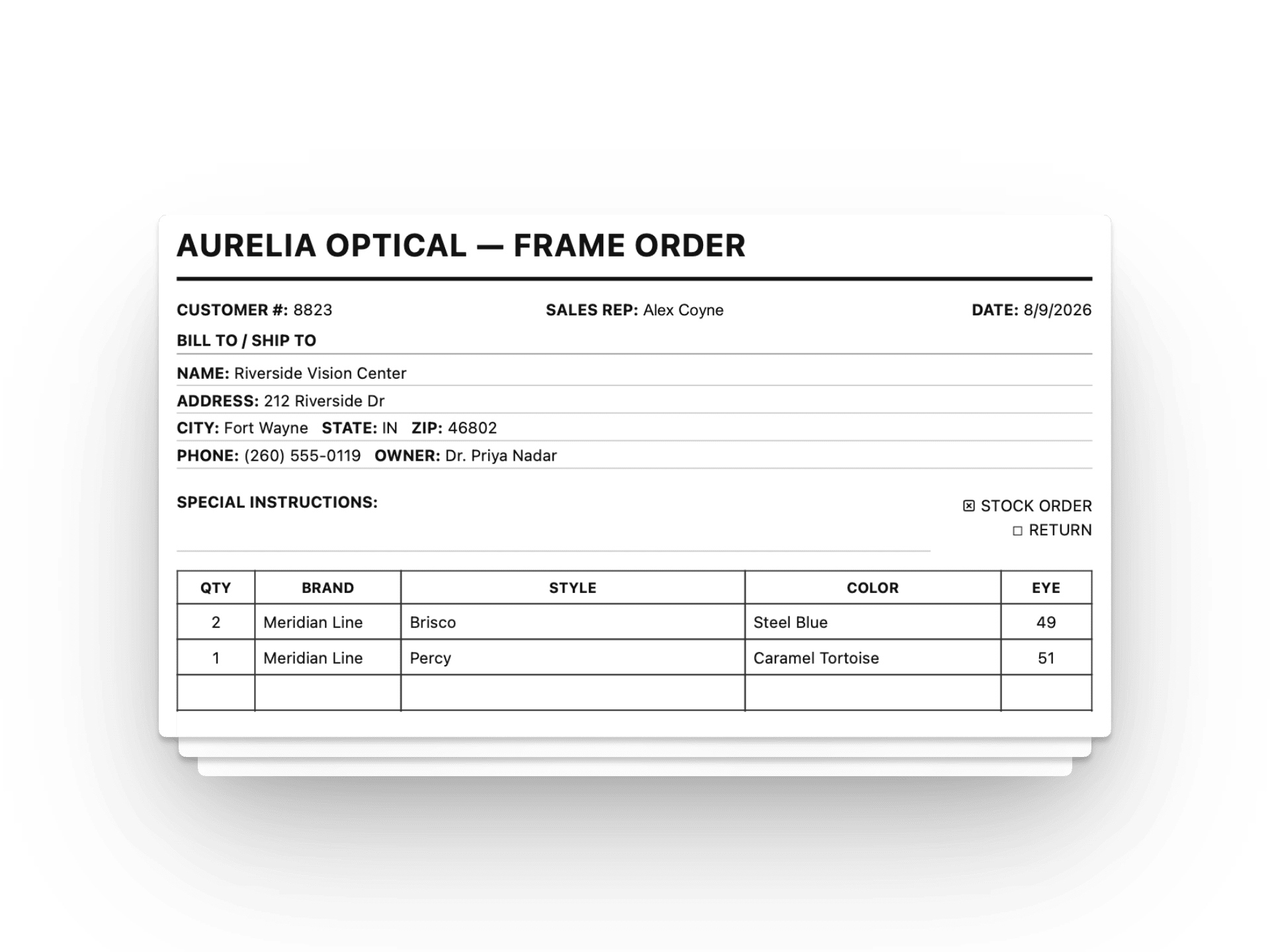
For manufacturers, Frameboard delivers clean, typed orders on their own forms, so teams spend less time deciphering photos of handwriting. If you already have systems managing inventory or catalogs, we connect to them directly.
The short version
The PDF is where we start. Not where we stop.
The typed PDF works today because it asks nothing of a manufacturer: no new login, no integration project, nothing to build. That's the point, and it stays true no matter how far the rest of this grows. But the PDF is a bridge, not the destination. The goal is a direct electronic connection with every manufacturer on the platform, especially the ones who haven't had the reps or the budget to build that connection themselves. If your team already built electronic ordering, that's not a reason this page doesn't apply to you. It's the same problem we're solving, just across every other line a rep carries alongside yours.
Manual order intake costs more than it looks like.
Handwritten order forms have been the industry default for decades. That does not make them cheap. Someone on your team is reading photos, re-keying line items, and catching errors after the fact. That is real time, and real risk.
The gap between reps and manufacturers is mostly a workflow gap. It comes down to disconnected systems and no practical way to bridge them, not a lack of willingness on either side.
Reps send orders as photos of handwritten forms. Someone on your team has to read and re-key them.
There is no reliable way to know when a rep is quoting a discontinued frame or working from an outdated catalog.
Order errors get caught late. After the rep has left, sometimes after you have already started processing.
Most manufacturers have systems that track inventory or orders. Almost none of them reach the rep who's actually standing in the office.
Some manufacturers have gone further and built their own ordering system for reps. That solves it for the one line, not the other lines those same reps carry, or the fact that your team now has to maintain that system alone.
What Frameboard does today
Your catalog and order setup, kept in step.
Frameboard fits into the systems you already use to manage product data. We handle the catalog, inventory connections, and form setup that let reps work from current information in the field.
Your live catalog in the app
We bring your frames, colors, eye sizes, and photos into Frameboard, so reps work from the same product line your team maintains.
Catalog and inventory connections
If your data lives in an ERP, product database, spreadsheet, or export, we can work from it. Updates to styles and availability do not need a second manual entry.
Order history, brought forward
When a manufacturer can share what an account has already ordered, Frameboard brings that history into the app. A rep's first visit to an office starts with real purchase history already on file. It works the same way the catalog connections above do: a file today, a direct feed as that connection matures.
Forms kept current
We set up your official order form and update it when your fields, pricing columns, or return authorization details change.
Ongoing system support
We work with your team as your line changes, keeping the catalog and form setup aligned instead of leaving the maintenance to a rep in the field.
What manufacturers get.
Your reps send clean, legible orders on your form, so your team can spend less time deciphering handwriting and more time processing what was ordered.
Clean orders from the field
Reps submit the order as they work with the account. Your team receives typed line items instead of a photo that needs to be read and entered again.
Your official form, already filled in
Frameboard generates a typed PDF on your own order form for every order. The fields and layout your team expects are already there.
Sent to the right company
Each manufacturer's portion is automatically emailed to the address you specify. Your team never has to sort through anything that isn't yours.
Less cleanup before processing
Consistent orders are easier to review, easier to process, and less likely to send someone back to a rep for a clearer copy.
How orders move
Your form, or your system of record. Either way, it's clean.
Whatever a rep writes up in the field, Frameboard turns your portion into exactly what your team expects: a typed official form to the inbox you already watch, or a direct feed if you're connected by FTP, SFTP, or API. It arrives complete and correct on its own, the same way every time.
You don't need to change how you process orders either way. If it's the form, it's the layout your team already knows, typed instead of handwritten. If it's a direct feed, it lands the way your system already expects it.
Rep Activities
Processing
Orders received
Rep order · Typed
Sent directly from Frameboard
→ orders@lindeneyewear.com
A different kind of technology partner
We do the setup work so you do not have to.
Most software vendors hand you a login and point you to documentation. Frameboard works directly with each manufacturer: getting your catalog right, keeping it accurate, and handling updates when your line changes, without a service ticket.
Most independent manufacturers do not have an IT team available to build and maintain rep integrations. We fill that gap at a fraction of what a custom project costs, and all you need to maintain is a working contact.
Catalog onboarding
We get your full product line into the app (frames, colors, eye sizes, and photos) and keep it current as your line evolves.
Form maintenance
When your order form changes, we update it. Reps always send on the latest version without any coordination required from you.
Ongoing accuracy
Discontinued frames drop out automatically. New models appear. The catalog your reps see reflects what you actually have available.
Working with your existing systems
Connect your catalog. Receive orders your way.
Frameboard works in both directions. On the catalog side, we sync from wherever you already manage your product data. On the order side, we deliver completed orders through the channel your team already uses to process them. Neither requires new software on your end.
Keeping your catalog current
Many manufacturers have a system (an ERP, an inventory tool, a spreadsheet) that holds the authoritative record of what they sell. We connect to it so you are not maintaining a separate copy of that data just to keep Frameboard in sync.
Flat files
If your catalog or inventory data lives in a spreadsheet, ERP export, or CSV, that works. Send us a file on whatever schedule makes sense and we keep Frameboard in sync.
API connections
If your ERP, order management platform, or product database exposes an API, we can connect to it directly. Updates flow automatically without anyone sending files.
Manual updates
No existing system? That is fine too. We maintain your catalog and form directly. A phone call or email when something changes is enough.
What a connected catalog means in practice
Less manual work on both sides.
When Frameboard draws from the same source you already maintain, updates propagate on their own. A new frame appears in the app. A discontinued style disappears. Reps work from current data without anyone sending emails to make it happen.
Fewer entry errors
Catalog data sourced from your system of record rather than a manual re-entry means fewer typos and stale SKUs reaching a rep.
Less coordination overhead
When your catalog is connected, adding a frame in your system means it shows up in the app. No emails to vendors, no manual syncs.
Lower operational cost
Frameboard handles the connection work as part of the partnership. There is no separate integration project to scope, bid, or maintain.
Cleaner order processing
Orders that arrive through a consistent, structured channel take less time to process. Less deciphering, more fulfilling.
Receiving orders the way your system expects them
Completed orders can be delivered through the channel your team already uses to process them. You choose the format; Frameboard adapts.
Automated email
Orders arrive as a PDF or CSV attachment to the inbox your team already monitors. No new software, no new login. It works the way email works.
FTP / SFTP
Frameboard can deposit order files to your FTP or SFTP server on your schedule. Your existing batch processing picks them up without any changes to your workflow.
Direct API
For manufacturers with an order management system that exposes an API, Frameboard can post orders directly the moment a rep sends, with no file handling in between.
What's on the road ahead
The gaps we are working to close.
These capabilities are on the roadmap. Not all of them are live yet, and we are being upfront about that, but they reflect where Frameboard is headed for manufacturers.
Order visibility
See what is being ordered across your rep network before forms hit your inbox. Earlier visibility into demand means fewer surprises.
Discontinuation guardrails
Frameboard already warns reps when a frame in their draft has been discontinued. More automated checks like this are on the roadmap.
Reorder flow
Order history in the rep's app makes repeat orders straightforward. Less friction for reorders means more of them actually happen.
A broader rep network
More manufacturers in Frameboard means more reps using it. Every catalog added to the platform increases the reach of the ones already there.
FAQ
Questions about your setup.
Frameboard works as the link between independent reps and the systems your team already uses to keep product data current and receive orders.
Does Frameboard use our existing order form?
Yes. We set up your official form and keep it current as fields, pricing columns, or return authorization details change. Reps send a typed PDF on the form your team already knows.
How are catalog and form updates handled?
We work with the source you already maintain, whether that is an ERP, product database, spreadsheet, or export. When a style changes or a form needs an update, we handle the Frameboard side with your team.
How can we receive orders?
Use the method that fits your operation: automated email with PDF or CSV attachments, FTP or SFTP delivery, or a direct API connection.
What do we need to do to get started?
Start with your catalog, current order form, and a working contact who can answer questions about your setup. We do the onboarding work, rather than handing your team a login and a documentation link.
How does Frameboard fit alongside our existing systems?
Frameboard sits between independent reps and the systems you already use. We keep product information available in the field and deliver clean orders back through the channel your team prefers, without asking you to replace your ERP or order process.
Get your catalog and form into Frameboard.
We work with each manufacturer individually to onboard your line and keep it current. Whether you need a simple file exchange, an API connection, or just want to start with a conversation. Tell us about your setup and we will take it from there.